
What if you could charge businesses $100 every time your AI books an appointment — and run three clients at once?
In the high-ticket local service industry — dental clinics, medspas, law firms, contractors — one of the biggest revenue leaks is slow response time.
When someone fills out an inquiry form, they expect a fast reply. Wait 15 minutes and that lead may already be on the phone with a competitor.
This guide walks you through the full blueprint for building, pitching, and launching an AI appointment setter service using Claude, Firecrawl, WhatsApp, and GoHighLevel.
You charge per booked appointment. The illustrative $12,000/month scenario below assumes three clients, 40 attributable bookings per client each month, and a $100 fee per booking.
⚡ Quick Answer
An AI appointment setter business uses tools like Claude and GoHighLevel to automate lead qualification and calendar booking for local service businesses.
You charge per booked appointment ($75–$150 is typical), pitch the outcome not the technology, and scale to $12,000/month with three well-qualified clients.
📋 In This Guide
- The Core Philosophy — Sell Outcomes, Not AI
- Phase 1 — Design the High-Converting AI Brain
- Phase 2 — Automated Research and a Custom Demo
- Phase 3 — The No-Show Protocol
- Phase 4 — Live Deployment via GoHighLevel
- Phase 5 — A Pricing Model That Can Scale to $12,000/Month
- Before You Go Live
- Summary Checklist
The Core Philosophy — Most Prospects Don’t Want AI. They Want Outcomes.
Learn this sales rule before you write a single prompt.
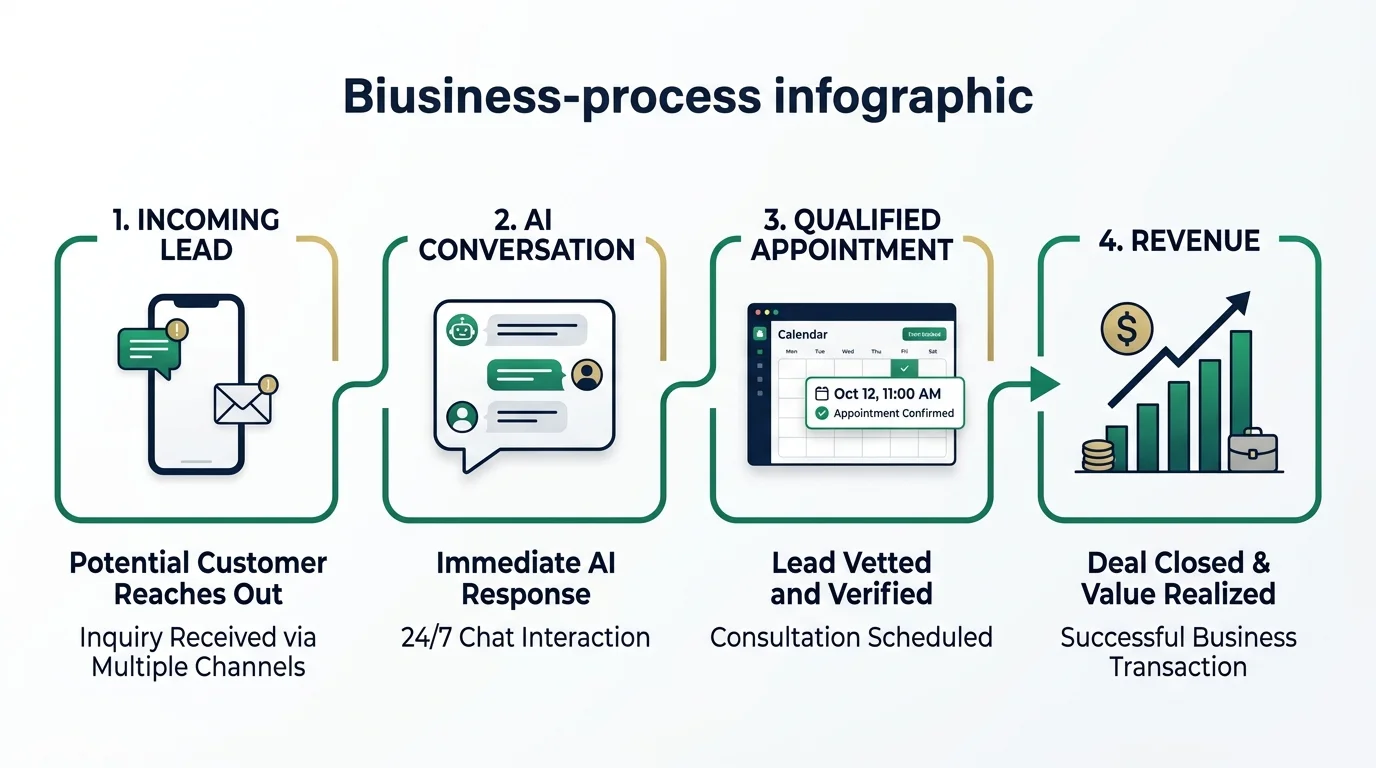
Most business owners don’t want chatbots or automation. They want booked appointments and revenue.
Pitch “cutting-edge LLMs” on a sales call and most owners will tune out. Offer a system that does these three things instead:
- Answers incoming inquiries on WhatsApp within 30 seconds — at any hour — when the channel and business workflow support it.
- Acknowledges the customer’s specific problem naturally, then moves the conversation toward a booking.
- Guides them through a few qualifying questions and books them onto the calendar.
Now you’re selling the business outcome, with the technology working behind the scenes. Frame every feature in business terms:
- Faster response can mean fewer lost leads.
- Qualification can save staff time.
- Direct booking can put more qualified opportunities on the calendar.
Phase 1 — Design the High-Converting AI Brain
A generic system prompt produces generic, robotic replies.
To turn Claude into a strong receptionist, split your prompt into modular blocks — then build in two behavior controls: Acknowledge First and Three Decision Points.
1. Acknowledge First
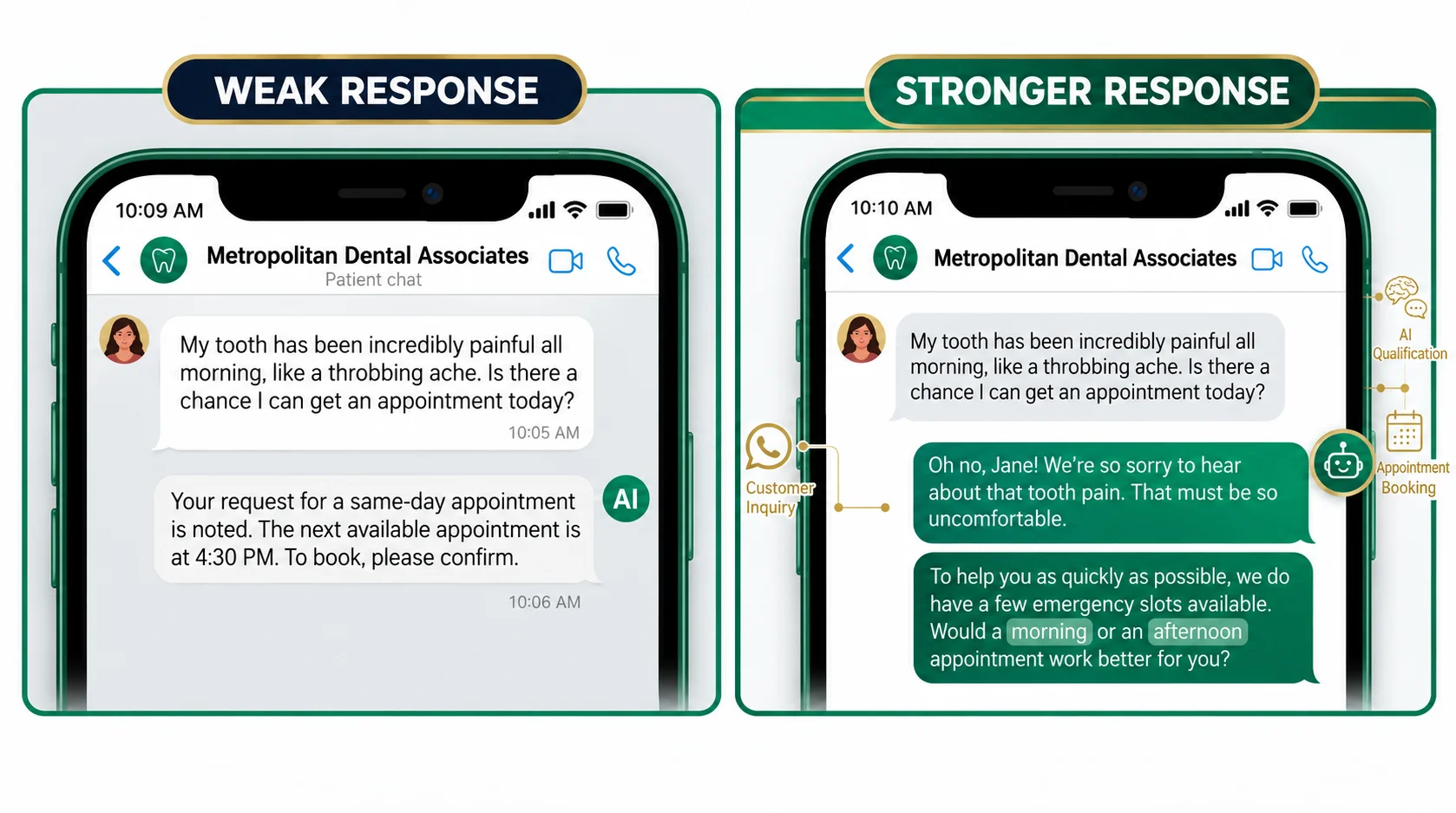
Basic bots give dry replies that skip the human side of the conversation. A strong agent acknowledges the customer’s problem first, then steers the chat toward a booking.
❌ Weak reply: “Sure, we have openings on Tuesday.”
✅ Stronger reply: “I’m sorry you’ve been dealing with tooth pain for two days. That sounds uncomfortable. Let’s find an appointment that works for you. Do you prefer morning or afternoon?”
Notice what the stronger reply doesn’t do. It never guesses at a diagnosis or claims the situation is urgent. It only responds to what the patient actually said.
2. Keep the Conversation to Three Decision Points
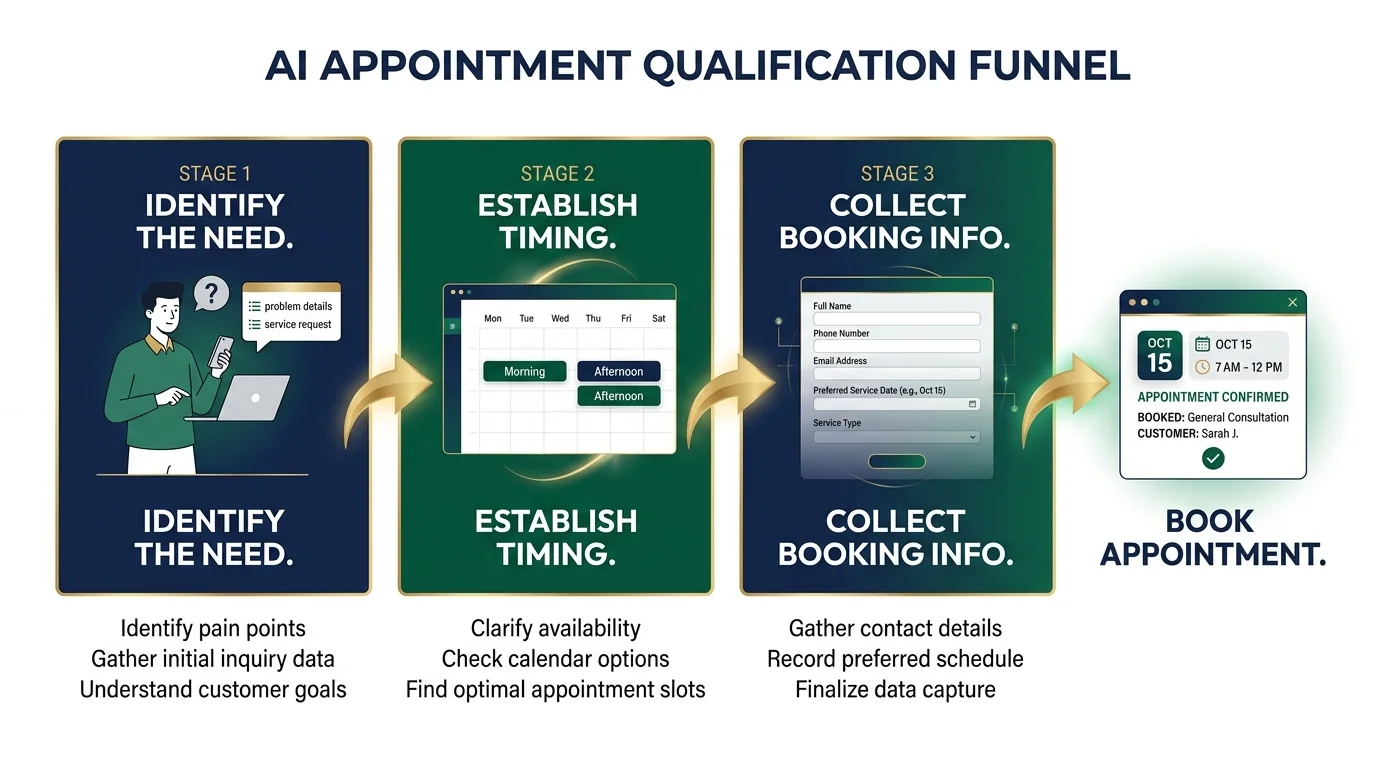
Never ask for every detail up front. Keep the chat to roughly three decision points — each one moving the customer closer to a booking.
- Identify the need. Is it tooth pain or a routine checkup?
- Establish timing. Does the customer prefer mornings or afternoons?
- Collect the minimum information needed to book. Name, phone number, and preferred date.
Booking and FAQ Integration
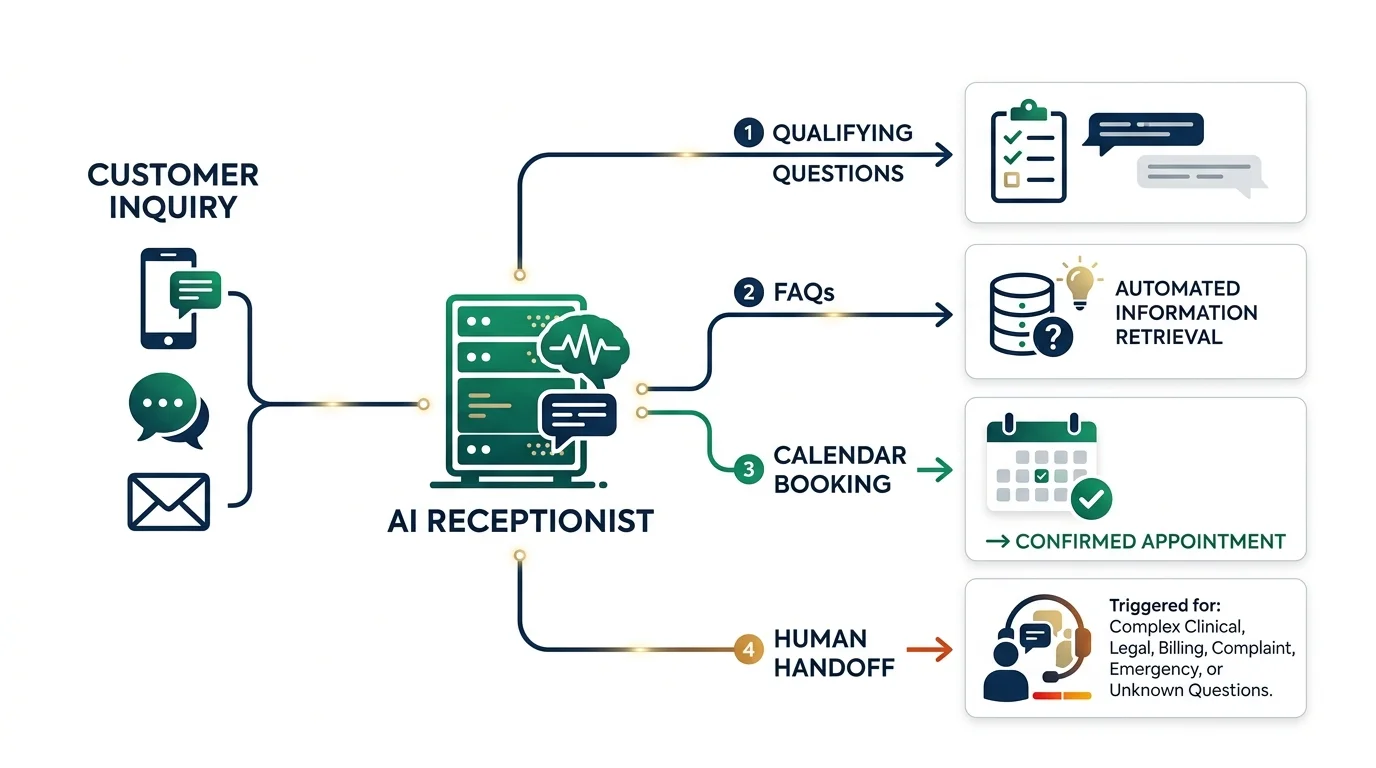
Once the customer has answered the qualifying questions, the AI books a confirmed calendar slot.
It also shares the address and insurance details from the clinic’s FAQ — giving the lead everything they need without forcing them to leave the conversation.
⚠️ Know When to Stop
Define clear handoff triggers for: clinical or legal questions, billing issues, complaints, emergencies, and questions the knowledge base can’t answer with confidence. In regulated fields, this rule matters as much as the booking flow itself.
Phase 2 — Automated Research and a Custom Demo Simulation
To close high-ticket deals, don’t just explain the AI — show the owner their own customer journey using real business details.
The goal is to let the owner experience a realistic lead conversation from first question through qualification, FAQ handling, and booking.
Step 1 — Web Scraping With Firecrawl
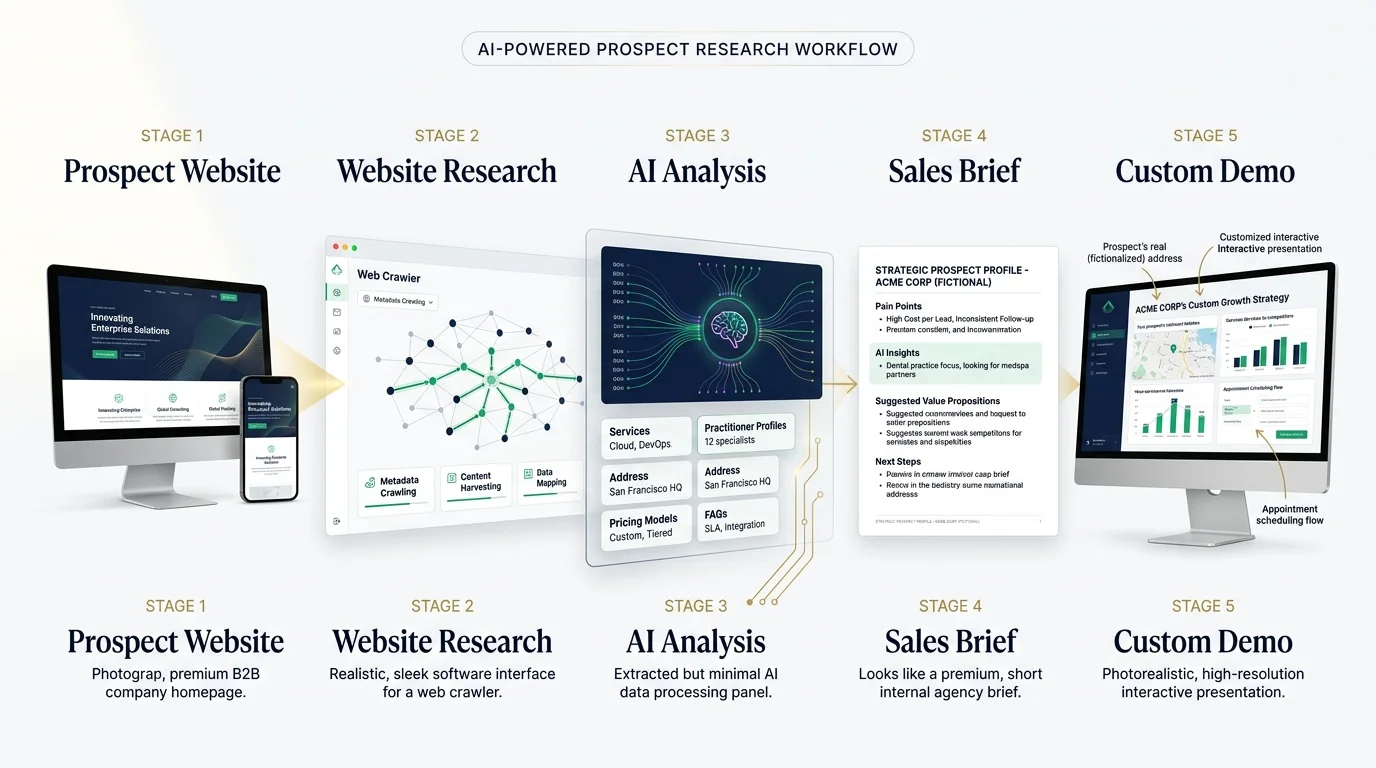
Automate the first pass of your research — then verify the important details yourself.
- Use Firecrawl (through Model Context Protocol inside Claude) to crawl the prospect’s website.
- Pull out core services, practitioner details, office address, pricing, and top FAQs.
- Write a sales-call brief that flags two or three observable conversion opportunities.
💡 Pro Tip: Treat gaps you find on the prospect’s site as hypotheses to test on the call — not facts to state. For example: “I noticed your site relies on web forms and doesn’t seem to offer an instant-response channel. Is that a pain point for you?” This opens a conversation instead of making an assumption.
Stick to publicly available business information. Respect the site’s terms and any privacy requirements. Keep unnecessary personal or sensitive details out of the model.
Step 2 — Generating a Live Demo Simulation
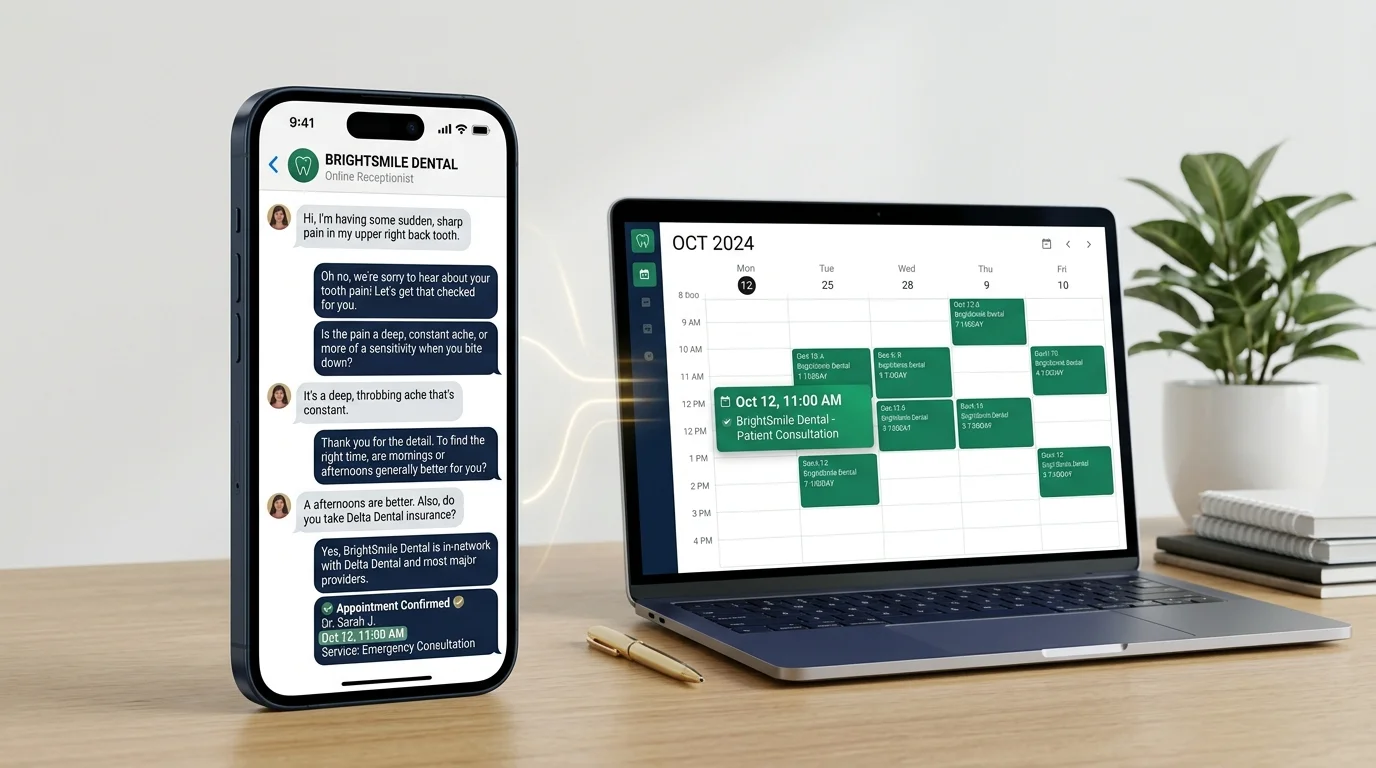
- Feed the business context into Claude along with an iPhone WhatsApp UI template.
- Get an Anthropic API key at console.anthropic.com.
- Deploy the web app for free on Netlify.
🔒 Keep Your API Key Safe
The front end sends the visitor’s message to a server-side function, which calls the model and returns the reply. Keep your API key on the server — never in browser code. The demo is not the prospect’s real WhatsApp channel. You connect the production channel later in Phase 4.
This pairs perfectly with the free AI tools we’ve covered for building online side hustles — Claude and Netlify together cost you almost nothing to demo a high-ticket service.
Phase 3 — The No-Show Protocol
A great demo can’t close a deal if the prospect doesn’t show up.
Use this three-step commitment sequence to improve your show-up rate — and track acceptance, attendance, and recovery rates across your calls so you know what’s working.
- Google Calendar invite. Send it right away and ask them to accept it.
- The research call, 24 hours before. Call or message the prospect with a short, specific question:
“Hey Dr. Jones, I’m finalizing your custom WhatsApp demo for tomorrow’s call. Quick question — are you open on alternate Saturdays, or strictly Monday to Friday?”
Why this works: You give the prospect a concrete reason to engage before the call — and you gather details that make the demo more relevant.
- The 5-minute no-show recovery. If the prospect runs five minutes late, open the Google Calendar event and click Email Guests.
- Send a simple note: “Hey, are you able to make it?” That gives the prospect a concrete reason to engage and may recover the conversation.
If they still don’t reply, send one short follow-up with a simple rescheduling link. Don’t chase them again and again — your time has value too.
Phase 4 — Live Deployment via GoHighLevel
Once the client approves the implementation, move the AI onto their real business channels using GoHighLevel.
| # | Step | What to Do |
|---|---|---|
| 1 | Format the prompt | Use Claude to split your master prompt into GoHighLevel’s native fields: Personality & tone / Goal & booking directive / Custom knowledge base & FAQs |
| 2 | Choose the channel | Use where the client already gets inquiries: WhatsApp Business, SMS, Instagram, or Facebook Messenger |
| 3 | Set response delay | Choose a delay appropriate to the channel — without adding friction to urgent inquiries |
| 4 | Connect accounts | Link GoHighLevel to the client’s Facebook Business account and WhatsApp Business number |
| 5 | Test before launch | Run common questions, vague requests, failed bookings, handoffs, opt-outs, and edge cases. Start with a monitored pilot |
| 6 | Go live | After the pilot passes your tests, set the agent as Primary |
Phase 5 — A Pricing Model That Can Scale to $12,000/Month
Many agencies push flat monthly retainers (~$1,000/month) or big upfront setup fees.
Some high-ticket businesses may prefer performance-based pricing because it ties your fees directly to measurable outcomes.
This is also what separates an AI appointment setter service from a generic AI side hustle — you’re not charging for the tool. You’re charging for the result it produces.
How to Calculate Your Per-Appointment Fee on a Sales Call
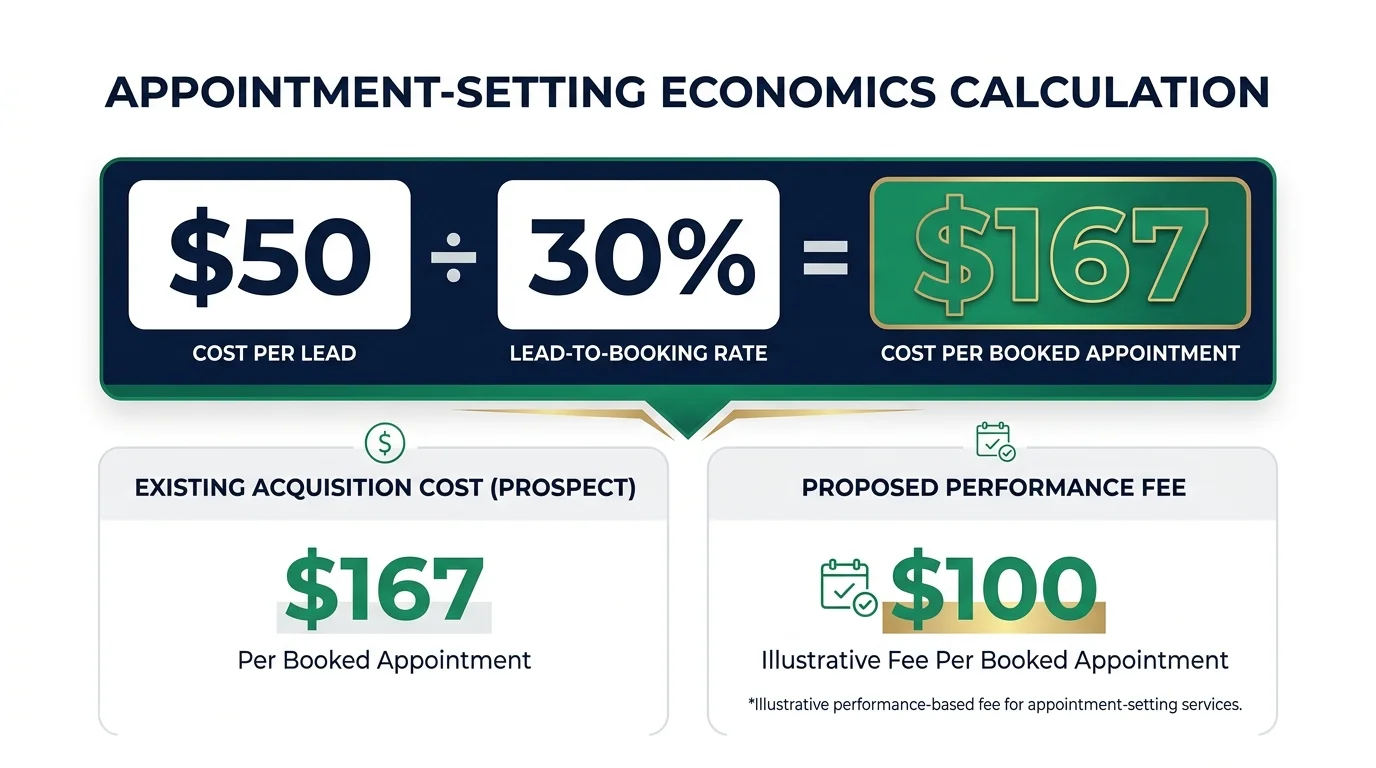
- Ask for current lead cost. “What do you currently pay per lead on Google or Facebook ads?” (Example: $50 per lead)
- Ask for the lead-to-booking rate. “Out of 10 form submissions, how many end up booking?” (Example: 30%)
- Calculate the cost per booked appointment:
Cost Per Booked Appointment
= Cost Per Lead ÷ Lead-to-Booking Rate
= $50 ÷ 0.30 ≈ $167
At $50/lead and a 30% booking rate, their current cost per booked appointment is ~$167
- Define the billable event before launch. Decide whether you bill for a scheduled, confirmed, or showed-up appointment. Account for cancellations and no-shows.
- Present the offer. A fee that makes economic sense relative to their existing cost. For example: $100 per booked appointment — a meaningful saving against their $167 status quo.
💡 For qualified prospects, a low or zero setup fee reduces upfront friction. You recover your implementation costs through performance fees. Low-volume clients or complex integrations may still warrant a setup fee.
Agree on Attribution Before Launch
Performance pricing gets messy when both sides disagree about which bookings qualify for payment. Agree in writing before launch:
- Which leads are eligible
- What counts as a booked appointment
- How you handle duplicates
- When a booking becomes billable
Revenue Potential
Clients |
Bookings/Client/Month |
Fee/Booking |
Monthly Revenue |
|---|---|---|---|
1 |
40 |
$100 |
$4,000 |
2 |
40 |
$100 |
$8,000 |
3 |
40 |
$100 |
$12,000 |
Before you scale, work out your delivery costs per client. Count model usage, messaging, software, monitoring, support, and human handoffs. That lets you calculate your actual margin. Once the appointment-setting workflow is running smoothly, you can expand into broader
AI automation projects
and price those by scope, integrations, and expected business value.
Before You Go Live
If you deploy this blueprint in dental, medical, legal, or other sensitive fields, build these controls in before launch:
- Consent and messaging rules. Follow the rules for each channel you use.
- Privacy and data handling. Define what data you store, where, how long you retain it, and who can access it.
- AI disclosure. Disclose that the person is interacting with AI when required or appropriate for the channel and jurisdiction.
- Human escalation. Set clear paths from the AI to a real person.
- Emergency handling. Define a specific emergency response and escalation path — including when the AI must stop the normal booking flow entirely.
- Client approval. Have the client sign off on all knowledge base content before launch.
Summary Checklist — Your 5-Phase Blueprint
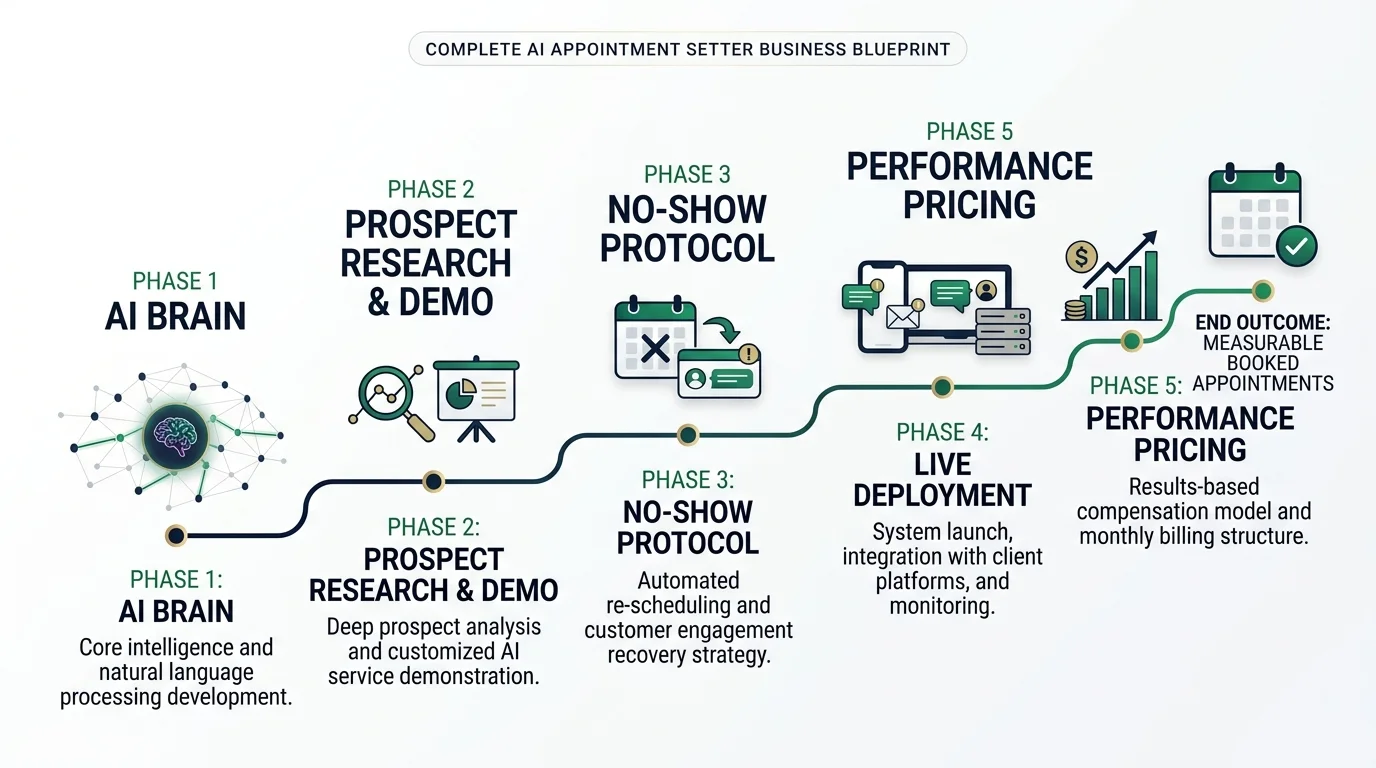
☐ Prompt engineering. Modular system prompt with Acknowledge First and three decision points.
☐ Automated prospecting. Scrape public prospect websites with Firecrawl and deploy a demo simulation on Netlify.
☐ Sales execution. Use the 3-step no-show protocol and track show-up rates across every call.
☐ GoHighLevel integration. Map your prompt blocks into GoHighLevel’s AI agent fields and set a response delay that fits the channel.
☐ Performance pricing. Charge per booked appointment, anchored to the prospect’s existing unit economics.
☐ Pre-launch controls. Define attribution, billing rules, escalation paths, privacy and consent requirements, and test cases before you go live.
The business isn’t the chatbot. It’s the system around it.
Faster response. Better qualification. Reliable booking. Measurable attribution. Disciplined follow-up. Build that system first — then scale the technology behind it.
📖 Keep Reading